



- New


✨Free delivery✨
Experience cutting-edge climate control with the Aqara Smart Thermostat W200. Designed for modern homes, it adapts to your lifestyle seamlessly through Apple's Adaptive Temperature technology, offering unparalleled comfort and energy efficiency. Smart, intuitive, and responsive, it fits perfectly into any connected ecosystem.

The sleek and modern Aqara Smart Thermostat W200 panel provides an elegant look that fits any home interior. Its intuitive interface offers an all-in-one climate control solution combined with smart home management capabilities, integrating seamlessly into your living space.

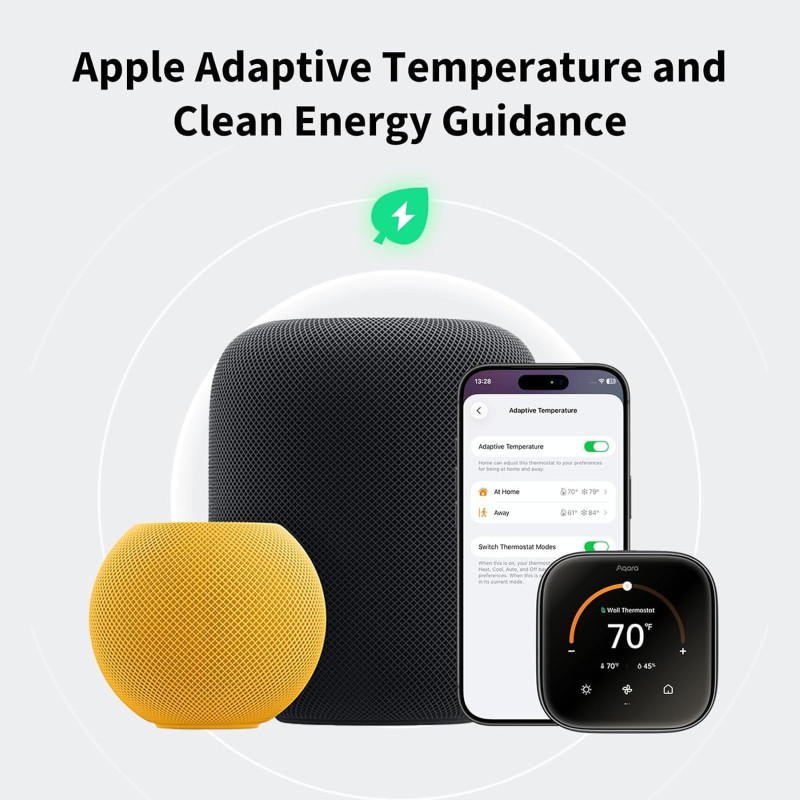
With the Apple Home app, Adaptive Temperature automatically adjusts the thermostat settings based on your iPhone's activity states such as 'home', 'sleep', 'away', and 'extended away'. This intelligent feature ensures your comfort upon arrival and conserves energy when you’re not home, without the hassle of manual schedule management.
Note: Adaptive Temperature requires a home hub (Apple TV or HomePod) and an iPhone or Apple Watch, all running version 26 or later.

Clean Energy Guidance adjusts the temperature subtly to make use of cleaner and more affordable times on the power grid based on personalized home forecasts derived from environmental and grid data. This feature helps you reduce your carbon footprint while maintaining comfort.
Note: Clean Energy Guidance is currently available only in the contiguous U.S.

The W200 uses Temperature and Humidity Soft Sensors that combine multiple readings to eliminate uneven heating or cooling. This ensures every room in your home maintains a consistent and comfortable climate tailored to your family’s needs.

By combining occupancy detection and room temperature info, the W200 intelligently prioritizes the room you occupy, adjusting the comfort level accordingly to deliver the perfect temperature wherever you are in your home.

Assign temperature and humidity sensors to preset modes like sleep or work, which activate automatically according to your schedule. This contextual control ensures targeted comfort in specific rooms throughout your daily activities.

Use the official Compatibility Checker on aqara.com to verify if the W200 thermostat is compatible with your HVAC system, giving you confidence before making your purchase.

Please note that the W200 is not compatible with line voltage (110/220V) systems, millivolt systems, or 0-10VDC systems, ensuring you are informed for proper use.

Input your current thermostat wires into the Compatibility Checker and follow the guide for quick and accurate confirmation of your system’s compatibility.

The Compatibility Checker indicates if your HVAC system requires a C-wire for stable power supply, which is sold separately if needed.

The included trim plate elegantly covers old wires and paint marks, delivering a clean and polished finish for your wall installation.

Tailor your thermostat display to show the data you value most—time, temperature, humidity, weather—all in a clean format. It also acts as a smart control hub for managing connected devices or viewing your front door camera, blending comfort and home awareness.

When paired with Aqara doorbells and smart locks, receive real-time snapshots on your thermostat when someone rings and unlock your door directly from the screen, simplifying daily convenience.

Manage your smart home devices smoothly from one place, including lighting, curtain drivers, and wall switches. The thermostat is designed to control Aqara devices exclusively, keeping your home automation connected and efficient.
Note: Only Aqara devices can be controlled from this panel.

Equipped with mmWave radar technology, the W200 detects human presence within 3 meters and a 120° field of view. This enables accurate presence-based automations and smart climate control tailored to your movements.

The W200 can operate as a standalone sensor to trigger powerful automations like turning lights on, adjusting devices, or activating security routines across Aqara and third-party Matter-compatible platforms, expanding your smart home's possibilities.
Manage your heating from anywhere with your phone. Adjust your home's temperature easily without leaving your bed or while away, ensuring comfort for you and your pets at all times.


Simply use Siri or Alexa to adjust your home's temperature with voice commands. Stay comfortable without moving a finger or leaving your sofa.
The clear touchscreen interface allows quick and direct adjustments to temperature and other settings, making control fast and simple when you’re near the device.


Link multiple W200 thermostats across different floors to monitor and adjust temperatures from a single screen, simplifying whole-home comfort management.
Enhance your thermostat’s accuracy by pairing it with compatible temperature or presence sensors. This ensures personalized comfort especially in key areas of your home.


Place multiple W100 Climate Sensors from Aqara throughout your rooms, providing individual control points for easy and precise temperature adjustment right where you need it.
*For W100, Zigbee mode via the Aqara Home app is required for this functionality.

The thermostat connects directly to major platforms including Apple, Google, Amazon, Samsung, and Home Assistant over dual-band Wi-Fi (2.4/5 GHz). This provides a reliable and future-ready smart home experience that keeps everything connected.

The W200 acts both as an Aqara Zigbee hub, allowing you to manage Aqara child devices, and as a Matter Bridge connecting Aqara Zigbee devices to Apple Home, Google Home, and Amazon Alexa for versatile cross-platform control.

Easily manage over 50 types of Matter-compatible devices through the Aqara Home app. This built-in controller centralizes device onboarding, organization, and operation into a single, intuitive interface.

Enhance your Thread network's coverage, speed, and reliability by using the W200 as a Thread Border Router and Mesh Extender—a smart upgrade for your home's wireless network.
How can I check if the Aqara Thermostat Hub W200 is compatible with my HVAC system?
Turn off the power at the breaker, remove the thermostat cover, and note down the wire labels such as R, W, G, and Y. Use the Aqara Compatibility Checker at aqara.com/en/w200-compatibility to verify compatibility and find out if a C-wire adapter is necessary.
Why can’t I use Adaptive Temperature or find it in the Home app?
Adaptive Temperature requires a home hub such as Apple TV or HomePod running version 26 or later. Additionally, all Home app members need to use an iPhone or Apple Watch with version 26 or later to enable this feature.
What should I do if the temperature reading is inaccurate?
Calibrate your device through the Aqara Home app. Navigate to Accessories > Thermostat Hub W200 > Settings (...) > Thermostat Settings > Threshold Settings to adjust the Temperature Compensation for better accuracy.
Does installing the Aqara Thermostat Hub W200 require a C-wire?
A C-wire is recommended for stable power. If your system doesn’t have one, a C-wire adapter might be necessary. Confirm this using the Compatibility Checker or during the app’s system check in setup.
What should I do if my Aqara Thermostat Hub W200 cannot power on?
1) If no C-wire exists, purchase the Aqara C-Wire Adapter for a reliable power supply.
2) For wires labeled Rc, Rh, or R, connect to Rc if there's only a single wire; if there are two, connect to Rc and Rh respectively.
3) Remove the screen and inspect for any bent pins that might disrupt connectivity.
Specific References
✨Free delivery✨